
If you searched for Subway Surfers unblocked, you probably want one simple answer: where can the game be played in a browser right now? I checked the available sources, separated the authorized web version from unofficial copies, and tested the main browser page before writing this guide.
- Authorized browser version: Working on Poki during our test.
- Official SYBO GitHub version: None verified.
- Changing proxy and game-library addresses: See the daily-maintained WikiLink directory.
My hands-on browser check
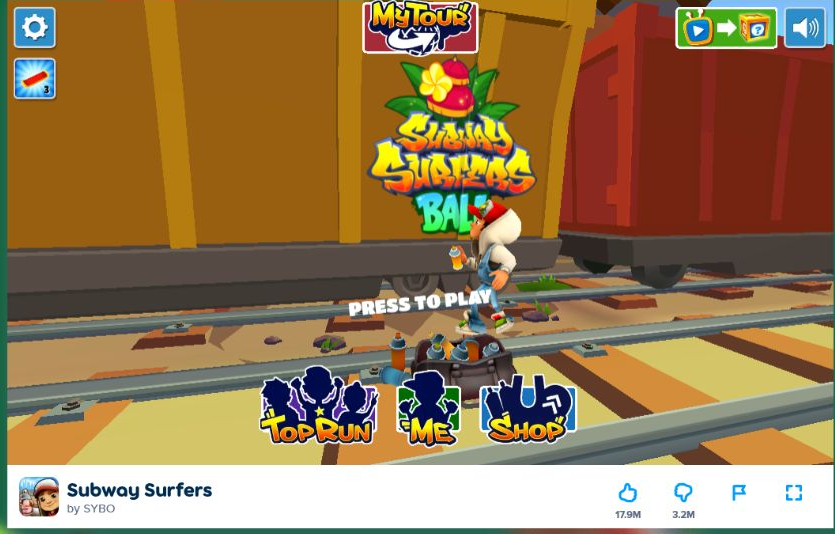
I opened the Poki game page in a fresh desktop browser session. The page first displayed a short preparation/advertising stage and then reached the game’s Press to Play screen. The game canvas loaded correctly, the sound control was visible, and Poki offered a fullscreen button below the player.
The experience was straightforward: there was no installer, browser extension, account form or payment request before reaching the play screen. That matters because SYBO warns that a website requesting a payment or deposit to play Subway Surfers is not an official version.
Editorial rating: 4.6/5
Why 4.6? The browser build is easy to reach, clearly credited to SYBO, works without a download and includes fullscreen support. I deducted points for the advertising/loading step and because availability still depends on the network and browser being used. This score reflects the tested web experience—not a claim that every school or workplace network permits the page.
Verified places to play Subway Surfers online
| Source | Status checked | What you should know |
|---|---|---|
| Poki | Verified browser version | Listed as “by SYBO”; loads in-browser with keyboard controls and fullscreen. |
| Google Play | Official mobile app | Best choice for Android when installing apps is allowed. |
| GitHub / GitHub Pages | No official SYBO release verified | Search results include fan-made clones, but I could not verify them as an official or authorized browser distribution. |
| Proxy game libraries | Availability changes | Check the game name inside the library. Use the stable WikiLink directory for current categories rather than an address that may expire. |
Is there an official Subway Surfers GitHub version?
I could not verify an official GitHub repository or GitHub Pages build released by SYBO for playing the complete game. Public GitHub searches return student projects, fan recreations and copied builds. Those are not the same as an authorized release, and a public repository does not automatically make the game files legitimate or safe.
For that reason, this guide does not recommend a random GitHub clone as “the official unblocked version.” If SYBO publishes an official web repository later, this section can be updated with the owner, license, repository and Pages URL.
What about web-proxy game pages?
Some browser-proxy projects include a built-in games section, but individual addresses and catalogs change frequently. A game appearing in one version does not guarantee that another copy contains it. At the time of this review, I am not labeling any individual rotating proxy address as the permanent Subway Surfers source.
How to play Subway Surfers in a browser
- Open the verified Subway Surfers page on Poki.
- Allow the game to finish its preparation screen.
- Select Press to Play.
- Use fullscreen if you want a larger game canvas.
- If the page does not load, confirm JavaScript and hardware acceleration are enabled, close heavy tabs and try a current version of Chrome, Edge, Firefox or Safari.
Keyboard controls
| Key | Action |
|---|---|
| Left / Right arrows | Change lanes |
| Up arrow | Jump |
| Down arrow | Roll |
| Space | Activate the hoverboard |
Does it work on a Chromebook?
The Poki version runs in an HTML5-capable browser, so a modern Chromebook can generally handle it without installing the Android app. Performance depends on the device, available memory, hardware acceleration and network policy. On an older Chromebook, close unused tabs, keep the game at its default window size and turn off other streaming media.
A blocked page does not necessarily mean the game is broken. Managed Chromebooks can have administrator policies controlling gaming sites, scripts, ads, storage or fullscreen. If the device belongs to a school, ask the administrator or use an approved break-time games collection.
Official Subway Surfers gameplay video
This official trailer from the verified Subway Surfers channel shows the game’s running, lane-switching, jumping and hoverboard style.
Is Subway Surfers safe to play online?
The main risk is confusing the real browser release with a clone. Avoid pages that ask you to download an unknown executable, install an extension, enable notifications, submit a school login or pay a deposit. SYBO’s own help center says the game is free and warns that websites requesting payment or a deposit are not official versions.
Before opening an unfamiliar host, you can also use the Rusty Nail Link Safety Checker. A safety scan is useful, but it does not replace your own judgment or an organization’s access rules.
Frequently asked questions
Can I play Subway Surfers online without downloading it?
Yes. Poki provides the authorized browser version credited to SYBO, and my test reached the play screen without an installer.
Why is Subway Surfers blocked at school?
Schools may categorize gaming sites or advertising networks as unsuitable for managed devices. Only the network administrator can explain the exact policy. Use approved sites during permitted break times.
Is a GitHub copy safer because GitHub is trusted?
No. GitHub hosts code from many independent users. You still need to check the owner, license, repository history and what the page loads. I did not verify an official SYBO GitHub web release.
Where can I find updated game-library links?
Use the permanent Rusty Nail WikiLink page. It is better to update one directory than leave expired external addresses inside dozens of articles.
More from Rusty Nail Space
- Best Unblocked Game Websites
- Rusty Nail Web Games
- How to Play Minecraft on a School Chromebook
- How to Find Proxy Links for Secure Browsing