
Hey there! Want to add some awesome custom audio to your Roblox game? Good news – you can do it in under a minute! Whether you’re looking to add cool sound effects or the perfect background music, I’ve got you covered with this super simple guide.
Let’s Get Started!
First things first, you’ll need to head over to the Roblox Creator Dashboard. Just search for it or grab the link below. Once you click through, you’ll land on the main dashboard – think of it as your creative command center!

Finding the Audio Section
Okay, now look for the Audio option in your navigation menu. It’s pretty easy to spot! Click on it, and boom – you’re in the audio management area where all the magic happens.

Quick Check: Audio Requirements
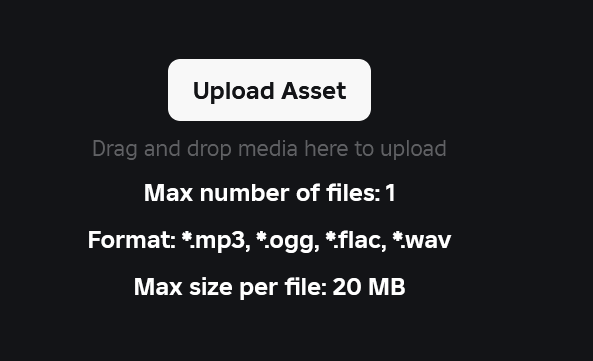
Before you upload anything, take a quick peek at the requirements listed on the page. Roblox has some guidelines about things like file format, length, and audio quality. Trust me, spending 30 seconds here will save you from headaches later!
Time to Upload!
Ready? Click that Upload Asset button. A window will pop up letting you browse for your audio file. Pick the one you want, then hit the blue Upload button. Easy peasy!
Heads Up: There’s a Catch
Here’s something super important to know: the audio you just uploaded will only work in your own games by default. If you’re planning to use it elsewhere on Roblox or want other creators to use it, you’ll need to take a few extra steps.
Want to Share Your Audio?
Click on the audio file you just uploaded. You’ll see a message saying you need approval before you can distribute it across Roblox. Don’t worry – this is just Roblox making sure everything stays legal and fair!
The Big Copyright Talk
Alright, this is really important, so listen up! Only submit audio for distribution if you actually own the copyright. That means:
- Music or sounds you created yourself
- Audio you recorded with your own equipment
- Sounds you have a proper license to use commercially
- Royalty-free audio that clearly allows this kind of use
If the audio isn’t yours or you don’t have permission, please don’t submit it. It’ll probably get rejected anyway, and nobody wants copyright strikes on their account!
Getting Your Audio Approved
If you do own the rights (awesome!), go ahead and click Submit for Review. Roblox will ask you to verify your identity – it’s just a quick security step to keep everything legit.
After that, you’ll need to agree to their terms and conditions. I know reading terms can be boring, but give them a quick scan since they explain what you’re responsible for as a creator.
You’re All Set!
And that’s it! Uploading audio to Roblox in 2025 is pretty straightforward once you know the steps. Just remember the golden rule: always make sure you have the right to use the audio you’re uploading. When you’re not sure about copyright stuff, stick with audio you made yourself or royalty-free tracks – it’s way safer!
Now go make your Roblox games sound amazing! 🎵

Helpful and well-paced. Looking forward to your next post.
Super helpful — bookmarked for future reference.
I must say this article is extremely well written, insightful, and packed with valuable knowledge that shows the author’s deep expertise on the subject, and I truly appreciate the time and effort that has gone into creating such high-quality content because it is not only helpful but also inspiring for readers like me who are always looking for trustworthy resources online. Keep up the good work and write more. i am a follower.
That’s a great point about balancing skill & luck in shooting games! Champion Zone’s focus on transparent algorithms-like their secure registration-sounds promising. Check out the champion zone app for a solid gaming experience! It’s interesting how platforms are prioritizing player trust now.
Interesting points about game transparency! Champion Zone’s focus on data-driven selection & secure environments seems key for player trust. Check out the champion zone app – solid platform for responsible gaming! 👍
Your blog is a breath of fresh air in the often mundane world of online content. Your unique perspective and engaging writing style never fail to leave a lasting impression. Thank you for sharing your insights with us.
Thank you I have just been searching for information approximately this topic for a while and yours is the best I have found out so far However what in regards to the bottom line Are you certain concerning the supply
Usually I do not read article on blogs however I would like to say that this writeup very compelled me to take a look at and do it Your writing style has been amazed me Thank you very nice article
Great article! I really appreciate the way you explained everything so clearly – it feels like you put a lot of effort into making it useful for readers. I’ve been exploring different tools and resources myself, and recently started using https://webdesignfreelancermunchen.de/ by Abdul, professional webdesigner in bamberg. It’s been a game changer for me, and reading your post actually gave me even more ideas on how to apply it. Thanks for sharing such valuable insights!
Thi is a great article no doubt about it, i just started following you and i enjoy reading this piece. Do you post often ? we have similar post on the german best freelancer platform called https://webdesignfreelancerdeutschland.de/ you can check it out if you want. Thank you